How EOT Crane Design Is Done Today (And Why It Needs Automation)
Table of Contents
Introduction
EOT crane design has traditionally been a complex and time-consuming engineering process involving calculations, CAD modeling, drafting, BOM creation, and repeated checking. For decades, engineers have relied on Excel sheets, standalone CAD software, and manual workflows to deliver crane designs.
While this approach may still work, it is slow, error-prone, inconsistent, and difficult to scale — especially for manufacturers handling large volumes of projects or custom crane requirements.
With increasing competition, reduced lead times, and growing expectations for accuracy and standardization, the crane manufacturing industry is rapidly shifting toward automation-driven design workflows.
This article explains how EOT crane design is done today, where the bottlenecks exist, and why forward-thinking OEMs are now adopting engineering automation tools like CraneGenie to stay ahead.
1. The Traditional EOT Crane Design Workflow
Most crane manufacturers follow a similar step-by-step process:
1 Customer Requirement Inputs
- Capacity
- Span
- Lift height
- Class of duty
- Speed requirements
- Building constraints
2 Engineering Calculations (Mostly Manual)
These are often scattered across multiple Excel files, old reference sheets, macros, or handwritten notes.
3 3D Models & 2D Layouts
Depending on the company, engineers use AutoCAD for GA drawings, Inventor/SOLIDWORKS for assemblies, or reuse previous project models.
This leads to:
- Missing or forgotten updates
- Unintentional carry-over of old design elements
- High risk of dimensional inconsistencies
4 Drafting & Fabrication Drawings
Draftsmen generate GA drawings, assembly drawings, fabrication drawings, and part drawings.
Often these drawings take hours or even days because changes ripple across many sheets.
5 BOM Preparation
BOM is usually created manually or partially automated from CAD. Common issues include wrong item codes, mismatched quantities, duplicate parts, and missing purchased items.
6 Rework & Approvals
Because multiple departments handle the same files, rework is common, manual corrections take time, approvals get delayed, and output quality varies from engineer to engineer.
2. Major Pain Points in Traditional Crane Design
Time-consuming
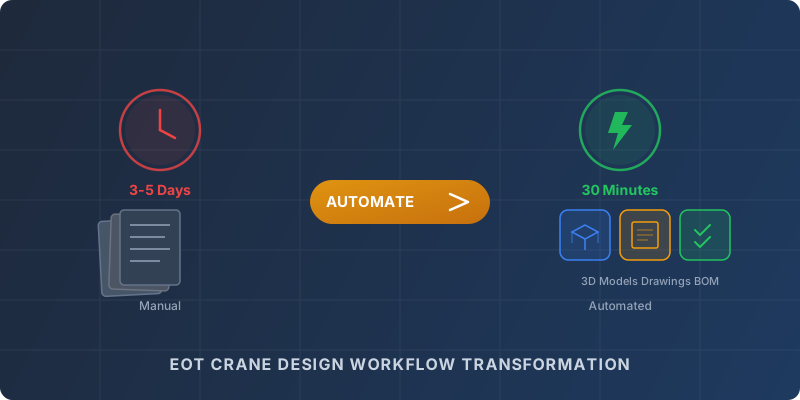
A complete crane design can take 1-3 days, depending on complexity.
High manual error risk
A single incorrect formula can lead to wrong loads, oversized motors, material wastage, or structural failures.
Lack of standardization
Every engineer interprets rules differently, leading to inconsistent outputs.
Scaling difficulty
More orders require more engineers, more training, and lead to more inconsistency.
Lengthy quoting cycle
Sales teams wait for engineering inputs, leading to lost deals to faster competitors.
Wasted engineering time
80% of work is repetitive: changing dimensions, updating formulas, re-doing drawings, re-building models.
3. Why Automation Is Becoming Essential for Crane Manufacturers
Automation tools like CraneGenie solve these challenges by transforming manual design workflows into fast, rule-based, standardized digital processes.
Instant Calculations
All engineering logic — load calculations, motor selection, gearbox sizing, wheel load calculations, girder design — is encoded once and reused forever. Engineers just enter capacity, span, lift, class, and speed, and the system produces results instantly.
Auto-generated 3D Models & GA Drawings
From a single input set, the system generates 3D assemblies, sub-assemblies, GA drawings, fabrication drawings, and part drawings — all synchronized with your company's templates and standards.
Zero Manual Errors
Since calculations and CAD generation are rule-based: no formula mistakes, no forgotten dimensions, no inconsistent drawings, no duplication issues. Every output is predictable and accurate.
Faster Project Delivery
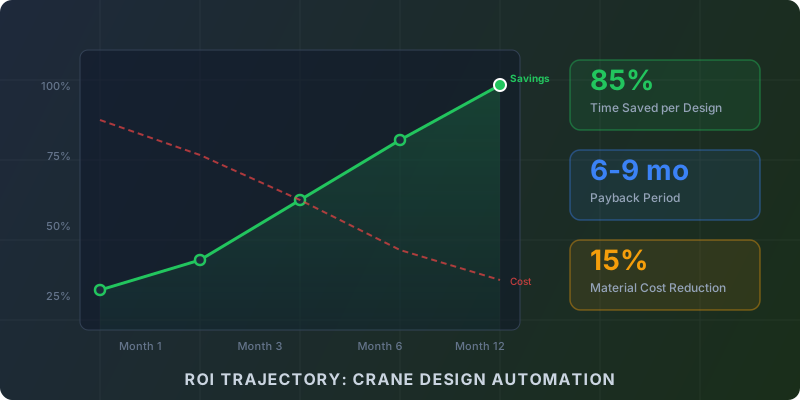
A process that earlier took 2-3 days can now be completed in 15-30 minutes. This gives OEMs faster turnaround, more orders from quicker proposals, and reduced project backlog.
Standardization Across the Company
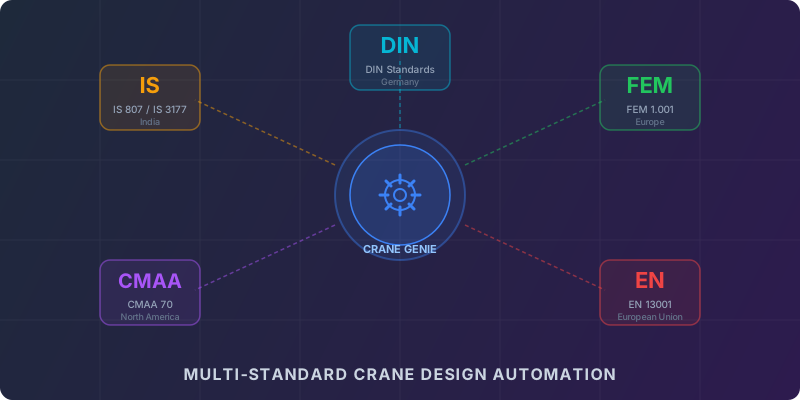
Every project follows the same formulas, the same CAD standards, the same design rules, and the same templates. Even if you hire new engineers, output stays consistent.
Better Material Cost Optimization
Automated calculations avoid oversizing, reduce excessive safety margins, and identify optimal component selection. Manufacturers often see 10-20% material cost reduction.
Scalability
Handle more orders without hiring more engineers. Scale your output capacity without scaling your team proportionally.
4. The Future: Fully Automated Crane Design Ecosystems
Forward-thinking crane manufacturers are moving towards:
Parametric 3D Design
Rule-Driven CAD Automation
Automated BOM Generation
Digital Workflows
Cloud Collaboration
ERP/CPQ Integration
CraneGenie sits at the center of this digital transformation — connecting engineering, drafting, quoting, and production into one seamless workflow.
Conclusion
EOT crane design no longer needs to be a slow, repetitive, error-prone process.
With tools like CraneGenie, manufacturers can automate calculations, 3D modeling, drawing generation, BOM preparation, and cost estimation — while maintaining full flexibility and ownership of their engineering logic.
Automation is no longer a luxury — it has become a competitive necessity.
Transform Your Crane Design Workflow
CraneGenie automates calculations, 3D modeling, GA drawings, fabrication drawings, and BOMs — all customized to your engineering standards.
Book a Free Demo